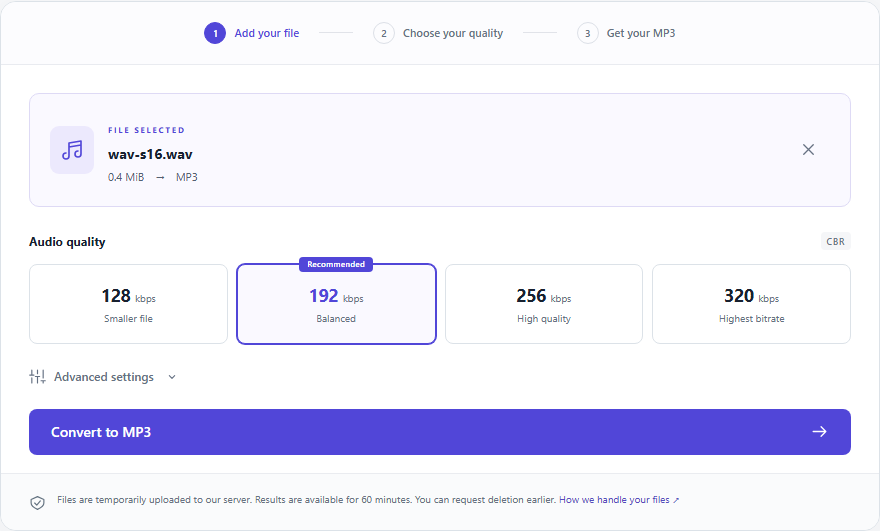
Start with 192 kbps
192 kbps CBR is the default balance between size and listening quality. Try 128 kbps for spoken recordings, or 256–320 kbps for a larger listening copy. Always keep your original if you plan to edit again.
Size follows bitrate and duration
At a constant bitrate, five minutes of audio is approximately 4.8 MB at 128 kbps, 7.2 MB at 192 kbps, 9.6 MB at 256 kbps, or 12 MB at 320 kbps, plus a small container overhead. These are decimal MB, not MiB. Mono does not halve size when the total bitrate stays fixed.
Listen before choosing
Convert the same short WAV or FLAC passage at 128 and 192 kbps. Listen at the same volume, especially to cymbals, room ambience and quiet speech. Choose the smaller result if it meets your needs. Increasing the bitrate of an already lossy source cannot restore information.
What Auto changes
Mono remains mono; stereo remains stereo. Surround sound is mixed to stereo. Sample rates of 32, 44.1 and 48 kHz are preserved; other rates are normalized to 44.1 kHz, or 48 kHz for multiples of 48 kHz, to support every offered bitrate.
THE COMPLETE GUIDE
Choose quality by listening, not by the biggest number
A good bitrate decision combines a source, a destination and a size budget. Use this deeper guide to turn those three constraints into a repeatable choice.
Bitrate is a data rate, not a recording score
A setting of 192 kbps describes the encoded stream’s data budget per second. It does not certify microphone quality, absence of distortion or the recording’s original resolution. A clean speech source at a modest setting may serve its purpose better than a noisy source encoded at 320 kbps. Evaluate the source and destination before treating bitrate as the only variable.
| File or concept | Relationship | What it means |
|---|---|---|
| CBR bitrate | sets | the approximate data size per second |
| Source quality | limits | what the new encoding can preserve |
Plan the size of a 30-minute listening copy
For a constant bitrate, multiply kbps by seconds and divide by 8,000 to estimate decimal MB. The table below uses 1,800 seconds and ignores small headers and padding. The upload cap remains 75 MiB for the source file; it is not the same measurement as the estimated output sizes below.
| Setting | 30 minutes | Relative to 128 kbps |
|---|---|---|
| 128 kbps | 28.8 MB | 1× |
| 192 kbps | 43.2 MB | 1.5× |
| 256 kbps | 57.6 MB | 2× |
| 320 kbps | 72 MB | 2.5× |
Begin with the best source you actually have
For a WAV, FLAC or ALAC source, the new MP3 is a lossy delivery copy. For AAC, Opus, Vorbis or WMA, it is another lossy encoding step. Those histories matter more than comparing codec names by their bitrate labels. Keep the earliest clean version and return to it whenever you need a different output.
Continue with a practical guide
Run a fair comparison with one changed setting
Prepare a representative short source locally if you want a quick experiment; this converter does not trim. Make two copies from that same source, keep channel settings equal and compare the same moments at similar playback levels. Avoid deciding from a louder version alone. Listen for quiet speech, high-frequency texture, reverberation and dense passages.
- Note the actual output size for both copies.
- Use the player or device where the copy will be heard.
- Choose the smaller copy only if it meets your listening requirement.
Do not use mono as a hidden size switch
At a fixed total bitrate, mono and stereo have approximately the same encoded payload size. Choose mono for channel needs, not an automatic promise of half the bytes. With multichannel input, review the downmix for speaker balance. The channel setting does not control noise reduction, loudness normalization or microphone separation.
Write down a rule for the task, not every recording
A repeatable rule might be “192 kbps for my first interview copy, then compare 128 if I need smaller delivery.” A music task may lead to a different rule after listening. Keep the destination requirement beside that rule and preserve the source. Changing future copies is then a deliberate choice, not an attempt to repair earlier conversions.